cadp_website-header_bom_studio_1900x720px

The tool for multisource and rule-based creation of bills of materials

BOM Studio

Bills of Materials (BOMs) are essential for executing projects in machinery and plant engineering. They are used for calculations, trigger purchase orders and internal manufacturing tasks, and form the basis for after-sales service. Errors in BOMs inevitably result in project delays, additional costs, increased workload, and—most importantly—customer complaints, leading to a loss of reputation.

The scope and increasing complexity of products are expanding the number of sources and input formats from which bills of materials (BOMs) are created. Additionally, more and more departments and disciplines require customized BOMs, both in terms of content and output format. Manually creating and managing these BOMs is liable to mistakes, time-consuming, and demands significant expertise from employees, often engineers. This valuable time is then diverted from their core project work.

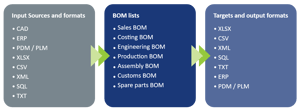
Highly flexible in terms of formats, sources and targets

cadp_202411_en_bom_studio_input_lists_target

Some companies are aware of this problem and have already developed their own applications or Excel macros to manage the BOM chaos. However, a downside of these solutions is often that sustainable support, documentation, and flexibility for new rules or sources cannot be guaranteed. Therefore, the question arises as to how secure and effective this approach truly is.

BOM Studio: Customized Bills of Materials

BOM Studio is the professional solution for all these challenges. This fully configurable software provides access to the required information from the desired sources - without delays, 100% traceable, and error-free, all with minimal personnel effort.

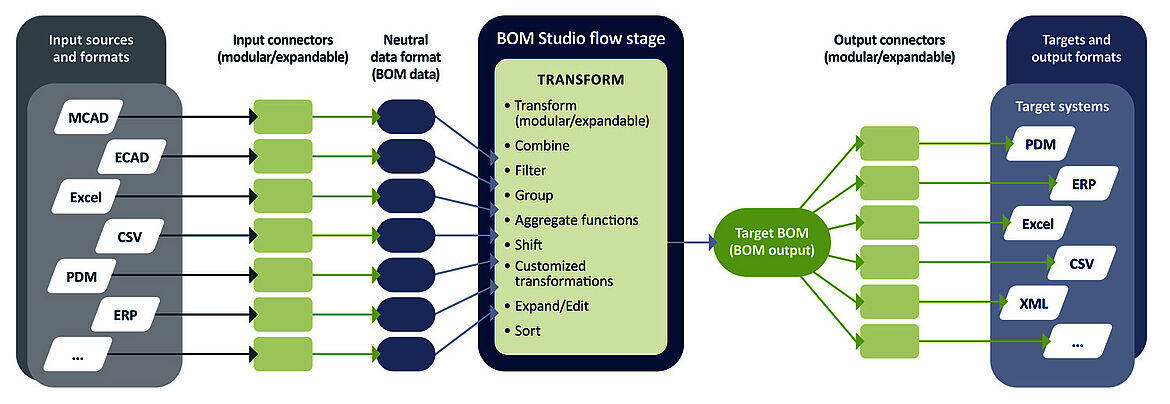
The data is harmonized, restructured based on definable rules, and exported in various formats. BOM Studio can be flexibly adapted to new requirements, sources, and additional file formats.


The highlights of BOM Studio:

1
NO CODE: Rule-based creation through configuration
2
Highly flexible with input and output formats and systems
3
WITHOUT DELAY thanks to automation
4
HIGH DATA QUALITY
5
MINIMAL PERSONNEL EFFORT
6
100% TRACEABLE

BOM Studio Workflow

Simply put, BOM Studio takes data from a wide variety of sources. These can be expanded, adjusted, or removed at any time. The collected information is then converted into a neutral format and can subsequently be transformed, combined, filtered, and more—without programming. These rules can be saved and then executed manually or automatically based on triggers. The compiled data is then output as a specific bill of materials to various target systems or in typical formats such as CSV or XML.

cadp_202411_en_bom_studio_workflow


BOM Studio modules

cadp_202411_bom_studio_architect


Architect

BOM Studio Architect is required to create the configurations and rules according to which incoming data is processed. It also defines events that initiate automatic processes. The graphical user interface allows for intuitive operation without the need for programming knowledge.

cadp_202411_bom_studio_client


Client

Defined workflows can be started manually via the BOM Studio clients.

BOM Studio Server


Server

The BOM Studio Server is the “control center”. It ensures smooth and effective workflow control. Workflows can be executed automatically via the server—for example, when a new file is added to the file system or an event occurs in PDM, ERP, or CAD.

cadp_202411_bom_studio_administrator


Administrator

The BOM Studio administrator is responsible for managing users and assigning permissions. This ensures efficient organization and security of data processing.

Download the BOM Studio Flyer

cadp_202411_en_bom_studio_flyer


Do you have any questions and are you interested in BOM Studio? Get in touch with us. We will be happy to show you the advantages of BOM Studio and make you an interesting offer.